
Dragon Shelter Mouse, keys, pads, and the sleep interact
Right-click talks, left-click uses, Shift moves five, Ctrl moves all, and the bed ends the day.
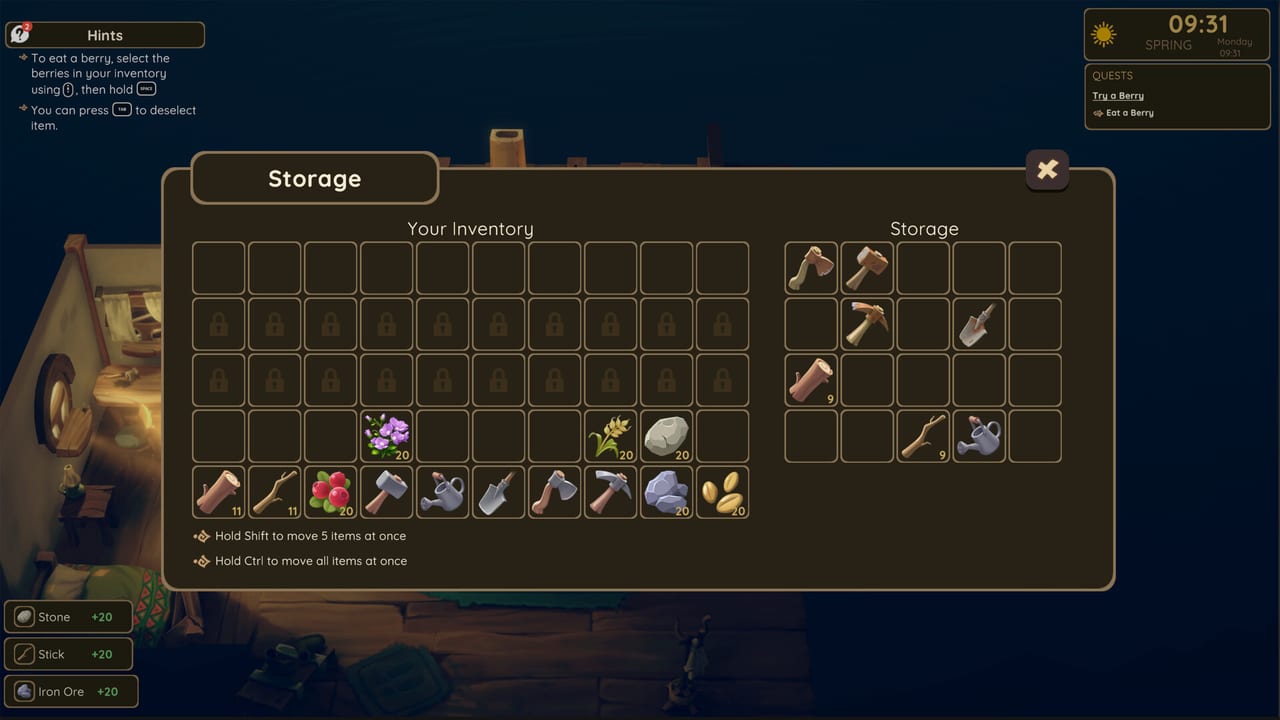
Dragon Shelter plays like a cozy farm sim that still expects you to know which mouse button plants a seed and which one pets a dragon. The demo is playable on Steam with keyboard and mouse plus gamepad support. This sheet is the HUD-facing list: interact, tools, inventory modifiers, sleep, and the Spring clock. It is not a story walkthrough. For the first-hour order, use getting started. For days after that, use the demo walkthrough. The full game launches September 24, 2026 on Windows Steam; these binds describe the public slice.
If a prompt refuses to appear, look at your hotbar. A selected axe will not pet. Tab exists for that exact embarrassment.
Mouse and keyboard: use versus talk
Left-click uses the selected tool or places the selected item. That is planting, chopping, digging, watering, and most “do the thing in this tile” actions. Right-click interacts. That is talking, petting, opening chests, and sleeping. E also interacts when a prompt is on screen. If you came from games where E is everything, you will still need the mouse buttons; the demo likes right-click for creature care.
Number keys select a hotbar slot. Cycle with intention. The rusty axe, hammer, pickaxe, watering can, and shovel from grandpa’s chest should live in the first slots on day one so you are not scrolling while a bed dries. Tab deselects. Empty hands are how you look at a water dragon without bonking it.
Movement is standard WASD on keyboard. Camera follow is gentle enough for cooking close-ups and wide enough for the pond. If you lose the dragon in the outdoor kitchen, deselect, walk, and right-click rather than swinging a tool “to get attention.”
Inventory: Shift five, Ctrl all, locked slots
The bag and storage furniture share a grammar. Shift moves five items. Ctrl moves all. Click without a modifier to move one. That trio matters the first time a berry bush explodes into a full stack and you need four for jam and six for a dragon. Shift is the “feed the creature, keep the rest” key. Ctrl is the “dump this ore, I am going to town” key.
Storage includes locked slots. They look like extra space and then refuse you. That is not a broken chest. Early furniture and upgrades are limited in the demo. Compress stacks, cook excess fruit, or leave stone on the ground until you have a reason to haul it. Iron ore is shiny and heavy; it does not help a first bread ticket.
When you move food, think in destinations: dragon pocket, jam chest, sell pile. Using Ctrl on the whole berry stack into a distant crate is how hunger happens off-screen. Use Shift to split a snack pile beside the door.
Sleep, time, and the Spring HUD
Time of day and season sit on the HUD. The demo shows Spring. That label is real and small. It does not mean you will rotate a full year in two to four hours. Watch the clock so dough and watering still fit before dark.
Sleep ends the day. Go to the bed in the house and right-click it. E works if the prompt is up. Standing in a field at night is not a substitute. Sleep is also the cleanest mental save point; the demo includes save/load, so use it, but treat the bed as the ritual. If a kitchen fire is still going, put it out before you nap. If a dragon is stuck between counters, extract it first so you do not load into a wedged helper.
Character customization happens at the start. Gamepad users should confirm look and invert options before the pond scene; you want petting to feel easy, not like a fight with the camera.
Gamepad notes from the demo
Steam lists gamepad support among core systems. Exact glyphs can shift with your pad, but the logic stays the same: one face button uses, another interacts, a bumper or d-pad changes slots, and a back button deselects. If interact and use feel swapped compared with another farm sim, check the prompt on the chest in grandpa’s house before you reach the dragon. The chest is a safe tutorial object. The dragon is not.
Analog movement helps in the cramped kitchen. Nudge, do not charge. Dragons get stuck when you and they occupy the same gap. Strafe out, call with the flute if it answers, and re-enter from a wider angle. Accessibility feedback after the demo asked for stronger pad support and larger fonts. If text is small, sit closer; a readability pass is on the studio’s list for later builds, not a hidden slider you missed.
Vibration, if your pad has it, is not required to farm. Play with whatever comfort lets you right-click-pet fifty times without annoyance. Family Sharing is listed on the Steam app, still single-player: one farmer, one save, optional dragon helper.
Common bind mistakes on the first farm
Planting with right-click: that talks to the bed or does nothing useful. Left-click plants.
Petting with left-click: that uses a tool. Tab, then right-click.
Sleeping by walking in circles: the bed is an interact. Right-click it.
Moving one berry twenty times: Shift for five, Ctrl for all.
Forgetting Tab: selected flame pepper seeds will go into the wrong soil if you panic-click. Deselect, look, then plant fiery beds on purpose. See farming for what those beds are.
Flute with a tool out: put the tool away. Speak, then assign. Care habits are on dragon care. Kitchen station order is on cooking.
Learn this sheet until the hands are boring. Boring hands are how you notice a scared dragon, a glowing shore patch, and a jam ticket from Rufus. Fancy hands are how you water the porch. When the binds are muscle memory, go back to the farm and play the actual game — soil, soup, and sleep — without staring at this list.
Frequently Asked Questions
Quick answers to the most common Dragon Shelter questions.
What does right-click do?
Interact: pet, talk, open chests, and sleep. Left-click uses tools and plants. The first-hour context is in getting started.
How do I move stacks faster?
Shift moves five items. Ctrl moves all. Single clicks move one. Locked slots are normal in demo storage; see the farm checklist for what to keep.
How do I end the day?
Right-click the bed in the house. The HUD shows time and Spring in the demo. Day order after that first night is the demo walkthrough.
Does the demo support a gamepad?
Yes. Confirm use versus interact on the house chest before you meet the water dragon.
Why will some chest slots not take items?
They are locked. Compress stacks and cook extras. Upgrade space is limited in the slice described on demo notes.